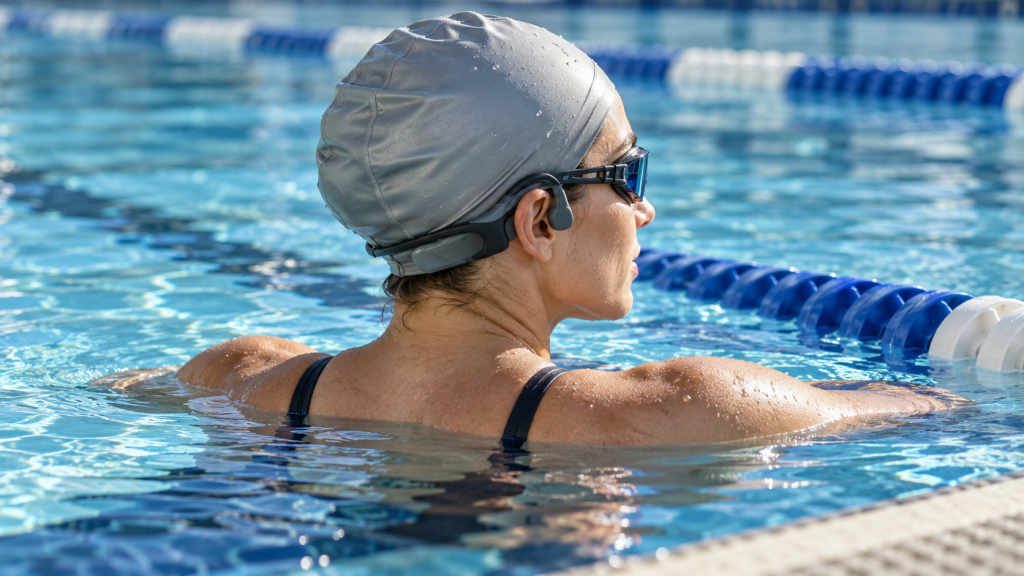
Quick answer: choose a playback path, then check its limits
You can listen to music while swimming with equipment that its manufacturer specifies for swimming. Documented options include players that store audio locally, such as the FINIS Duo, and matched transmitter-and-headset systems, such as Zygo Z2.
Downloading a playlist inside a phone app answers a different question: whether that app can play the content without an internet connection. You still need a suitable way to get the audio to your ears. Spotify’s offline listening guidance describes app and account conditions, rather than a general method for loading any swimming headset.
Before choosing a setup, identify where the audio is stored, how it reaches the listener, and which water-use conditions the exact model permits. The manufacturer examples below explain different designs; their capabilities do not establish what a TY model can do.
Why ordinary Bluetooth connections become unreliable underwater
Bluetooth uses the 2.4 GHz ISM band. Its reliable range depends on the equipment and its surroundings, as Bluetooth SIG explains. Research on radio propagation in water helps explain why a submerged receiver’s link can weaken. A connection that works beside the pool may therefore become unreliable during a swim.
The evidence needs careful interpretation. A study of underwater wireless sensor networks examined radio propagation with particular sensors and water conditions. It was not a Bluetooth headphone test and provides no universal listening distance. For a practical device restriction, Sony states that its NW-WS623 and NW-WS625 cannot receive phone music over Bluetooth underwater.
Water resistance is not a connection guarantee
Water protection and audio connectivity are separate specifications. A device may have defined immersion conditions while requiring a particular playback mode in the water. Shokz, for example, limits OpenSwim Pro underwater use to MP3 mode.
Read both the water-use instructions and the playback instructions. A waterproof label alone does not tell you whether a phone-to-headset connection will work during your swim.
Keep the signal path separate from the way sound reaches your ears
Bluetooth describes a wireless connection. Bone conduction describes how a device delivers sound to the listener. A bone-conduction design still needs an audio source, a playback method and appropriate water-use instructions. The Shokz S710 manual treats playback modes and wearing instructions separately.
For the design terminology, see our comparison of bone conduction and open-ear air conduction. That distinction helps explain the sound output, but it does not establish the model’s connection or swimming limits.
Different wireless systems also use different links. An explanation of ordinary Bluetooth’s limitations should not become a claim that every wireless technology is incapable of working underwater.
Compare where audio is stored and how it reaches your ears
Start by tracing the audio from its source to the listening device. The following table separates a local-file arrangement, an app’s offline content and a dedicated transmission system. An app’s offline mode can be part of a compatible setup; it does not provide the complete connection by itself.
| Arrangement or content state | Where the audio is available | Path to check | What still needs confirming |
|---|---|---|---|
| Local-file playback on a swim-specific player | Compatible files stored on the player | The player’s own local playback mode | File requirements, transfer method and permitted water use. Examples: the Shokz S710 manual and FINIS Duo manual. |
| Offline downloads inside a phone app | Content available within the app on a supported device | The device’s compatible audio output path | App/account conditions and a connection suitable for the intended setup. See Spotify offline listening. |
| A matched dedicated transmitter system | Audio supplied by a source device | The system’s source-to-transmitter and transmitter-to-headset links | Required matching components and each component’s limits. See the Zygo FAQ. |
- Arrangement or content state
- Local-file playback on a swim-specific player
- Where the audio is available
- Compatible files stored on the player
- Path to check
- The player’s own local playback mode
- What still needs confirming
- File requirements, transfer method and permitted water use. Examples: the Shokz S710 manual and FINIS Duo manual.
- Arrangement or content state
- Offline downloads inside a phone app
- Where the audio is available
- Content available within the app on a supported device
- Path to check
- The device’s compatible audio output path
- What still needs confirming
- App/account conditions and a connection suitable for the intended setup. See Spotify offline listening.
- Arrangement or content state
- A matched dedicated transmitter system
- Where the audio is available
- Audio supplied by a source device
- Path to check
- The system’s source-to-transmitter and transmitter-to-headset links
- What still needs confirming
- Required matching components and each component’s limits. See the Zygo FAQ.
These examples illustrate arrangements to investigate. They are not a ranking or an exhaustive list of swimming-audio products.
Local files on a swim-specific player
A local player holds the audio files it will play. That can remove the need for a live music connection from a phone during playback. The FINIS Duo manual documents this kind of arrangement and distinguishes supported files from protected files it cannot use.
Preparation still depends on the device. Check its file requirements, transfer connection and playback mode before buying. One player’s instructions do not establish another player’s capacity, controls or transfer process.
Offline downloads inside a phone app
An offline playlist can let an app play previously downloaded content when internet access is unavailable. It remains subject to that service’s rules and supported devices. Spotify and Apple Music describe offline listening within their services.
The next question is how the device playing that content will deliver it to the listener. Downloading in an app does not change the behavior of an ordinary Bluetooth link underwater. Check the proposed system’s connection requirements separately.
Dedicated transmitter-and-headset systems
Some systems use an additional transmitter. According to the Zygo FAQ, the Z2 case pairs with a phone over Bluetooth and sends audio to the headset using a different radio-frequency link. The case is a required part of that system.
Zygo also describes the case as splash-proof and says it cannot be submerged. This shows why the limits of each component matter. The headset’s intended use does not make the source device or transmitter suitable for the same exposure.
Zygo’s description applies to its matched system. Do not assume its transmitter works with other headsets.
Downloaded music is not always a transferable audio file
A track marked “downloaded” may be available for offline listening inside an app without being a file you can copy to a separate player. Spotify, for example, describes encrypted download storage on iPhone. Check permission, file access and compatibility individually.
| Check | Question to answer | What does not settle it |
|---|---|---|
| Permission | Are you authorized to reproduce this content in the way you intend? | The presence of a download button. |
| File access | Do you have access to a usable audio file, rather than only an app’s downloaded library? | Being able to play the track offline inside the app. |
| Device compatibility | Does the exact player accept the file and the required transfer method? | A familiar filename extension or an MP3-mode label. |
- Check
- Permission
- Question to answer
- Are you authorized to reproduce this content in the way you intend?
- What does not settle it
- The presence of a download button.
- Check
- File access
- Question to answer
- Do you have access to a usable audio file, rather than only an app’s downloaded library?
- What does not settle it
- Being able to play the track offline inside the app.
- Check
- Device compatibility
- Question to answer
- Does the exact player accept the file and the required transfer method?
- What does not settle it
- A familiar filename extension or an MP3-mode label.
These checks combine the separate issues covered in Spotify’s download guidance, Apple’s file-conversion and copyright guidance, and a player’s own manual, such as the Shokz S710 guide.
Check permission and access before checking the file type
An app can contain several kinds of content. Spotify’s Local Files feature lets users play eligible audio files already stored on their device. That feature should not be read as a way to export tracks downloaded from Spotify’s catalog.
Similarly, distinguish the Apple Music app from an Apple Music subscription. Apple documents both subscription downloads for offline listening and conversion of eligible files in the Mac app. The conversion article limits reproduction to material the user is permitted to copy. It also identifies restrictions on older protected AAC purchases.
Those instructions do not establish permission or a method to export subscription downloads to any swimming player. Confirm the rights and access for the particular content you plan to use.
Check the exact player’s file requirements
After permission and access are clear, consult the player’s supported-file documentation. Look for formats, encoding restrictions and the required transfer connection. A familiar extension alone does not establish compatibility.
For example, the Shokz S710 manual lists several formats for its MP3 mode. The mode’s name therefore does not mean that this particular model accepts only files ending in .mp3. The FINIS Duo manual has its own supported and unsupported file requirements.
Keep those lists attached to their models. They do not establish TY compatibility, and they should not be combined into a universal swimming-headphone format list.
What to check before choosing swimming headphones
Use the following questions to evaluate a particular setup. A clear model name and matching documentation are more useful than assuming a broad label covers every part of your intended use.
Identify the exact model and playback workflow
Confirm the product’s model and the manual that applies to it. Ask where the audio is stored, which device plays it, which mode is used in the water and whether a phone or extra transmitter is required. For local playback, also check file and transfer requirements. The Shokz S710 and FINIS Duo manuals illustrate why those questions belong to specific products.
For a TY model, the TY music and connection FAQ provides a starting point for current questions. If a capability you need is not clearly described, ask for documentation for your exact model.
Read water-use, fit and care limits
Check more than the headline waterproof rating:
- Which liquids and environments are permitted?
- What depth, duration and activity conditions apply?
- Are particular accessories or attachments required?
- What does the manufacturer specify about fit with a swim cap or goggles?
- What care, drying, charging and wet-control restrictions apply to each component?
Sony’s NW-WS623/WS625 water-resistance instructions distinguish liquids, accessories and test conditions. The FINIS Duo manual describes its own attachment and care requirements. These are reasons to read the exact model’s instructions, rather than borrow another product’s fit or maintenance procedure.
An IPX8 label alone does not establish permission for every depth, liquid or activity. Check facility rules as well; Sony’s swimming notes explicitly require users to follow the rules of the place where they swim. An open-ear design does not by itself establish that a listening setup is appropriate for every situation.
Ask for missing model information before relying on it
If an essential requirement is missing or conflicting, ask the manufacturer before choosing the setup. Provide the exact model, your intended swimming environment, your audio source and the connection or local-playback arrangement you want to use.
For a TY question, you can ask TY Support about your exact model. Ask for the applicable documentation. If the answer remains unclear, do not assume the product meets that requirement.
Questions about underwater playback
Does waterproof mean Bluetooth will work underwater?
Check water protection and connectivity separately. Shokz’s OpenSwim Pro product page, for example, limits underwater use to MP3 mode. A waterproof description does not establish a working phone-to-headset link during swimming.
Can I copy a Spotify download to any swimming headset?
Do not assume that a download inside the app is an accessible, authorized file for another player. Start with Spotify’s offline-listening conditions, then check file access and the exact player’s requirements. A downloaded playlist alone does not establish headset compatibility.
Does MP3 mode mean a headset plays only .mp3 files?
Read the model’s format list. The Shokz S710 manual lists formats beyond MP3 for that mode. Another player may have different requirements.
Are all bone-conduction headphones suitable for swimming?
The sound-delivery design does not establish permitted water use or the playback path. Check the exact model’s instructions for both. Shokz’s OpenSwim Pro product page, for example, specifies an underwater playback mode for that model; the S710 guide documents its playback and file requirements.
Do I need to take my phone into the water?
That depends on the documented playback arrangement. A local-file player can play stored audio, while Zygo’s system uses a source device and a separate case that must stay out of the water. Leaving a phone on land and using a system that needs no phone during playback are different arrangements.
If you are considering TY after checking these requirements, you can browse TY’s current swim collection for its product and support links.